Instrument
The Instrument class is a subclass of Panel. Since a typical project often includes multiple instruments, the Instrument class was created to simplify the creation of instrument user interfaces. This class provides the basic functionality, leaving us to implement only the instrument-specific parts. In the Instrument class, two additional event loops run alongside the Module (and Panel) event loop. One handles the basic operations of the instruments, which appear as individual module commands.
Default Module Commands
Check Connection QUERY
Checks the connection between the instrument and the application
Check Config QUERY
Checks the parameters in the Config Group; if all variables are non-empty, it calls the Connect module command
Connect ACTION
Connects to the instrument
Disconnect ACTION
Disconnects from the instrument
Check Warnings LOG
Logs warnings from the instrument
Set Editable Configs CONFIG
Defines user-editable variables, which will then be accessible from the Instrument Menu
Poll Data PERIODIC
Called periodically when a device is connected. Perform periodic queries to display informational data on the UI. Can be disabled via Set Disable Poll Data
Define Non Instrument Actions CONFIG
Specify Interface Commands that should not be handled in Instrument Actions.vi
Disable Device CONTROL
Disables the instrument
Enable Device CONTROL
Enables the instrument
There is a separate virtual VI for each of these commands, which must be overridden when creating the instrument. All other module commands for a given instrument can be handled in Instrument Actions.vi.
Command Handling
The basic logic of the Instrument class is that it treats the interface commands defined by the instances as actions to be sent to the device. For connected instruments, these are handled by Instrument Actions.vi; if the instrument is not connected, it immediately returns an error message (Instrument is not connected. Action was not executed). If Instrument Actions.vi does not handle the received message, it also returns an error message (Unexpected Instrument Action received).
The exception to this are the interface commands listed in Define Non Instrument Actions.vi. The Instrument Core ignores these; they must be processed elsewhere (for example, in the Main Loop of a derived project).
In the Main Loop of a child VI, you must not handle (or at least send a reply to) any interface command that is not listed in Define Non Instrument Actions.vi. If you want to send a message from the Main Loop or UI Loop of a child VI to Instrument Actions.vi, you must add it as an Interface Command.
Instrument Menu
An interface has been created for the instruments, providing convenient access to all devices within a project. The Instruments Menu allows you to view device parameters (IP address, COM port, etc.) as well as logged warnings. These messages are processed by the other event loop within the Instrument.
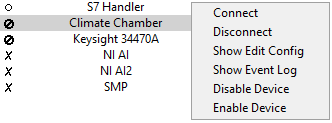
The Instrument Menu, configured in the application’s main.vi, can be used to access and configure individual instruments. A pop-up menu can be opened by right-clicking. The instrument selected in the Instrument Menu is automatically loaded into the General View.
Connection Status Indicators
Simulated STATE
The instrument is running in simulated mode
Not Connected STATE
The UI device is not connected to the application
Connected STATE
The UI device is connected and operational
Disabled STATE
The device is disabled and will not process commands
Required Overrides
When creating a new instrument, you must override the following VIs in addition to Actor Core and Initialize Module Keys:
Check Connection.vi OVERRIDE
Implement the connection check logic for your instrument
Close Resource.vi OVERRIDE
Implement cleanup and resource release
Connect to Instrument.vi OVERRIDE
Implement the connection procedure for your instrument
Instrument Actions.vi OVERRIDE
Handle instrument-specific module commands
Set Editable Configs.vi OVERRIDE
Define which configuration variables are user-editable