Interface Commands
Interface messages were created to facilitate communication between modules. Previously, for one module to send a message to another, the recipient module had to create a message belonging to the Message class for each distinct message. This required a lot of repetitive work, and often the message simply called one of the recipient module’s commands.
To replace this, Send Command to Module.vi was created — it allows
you to call the module commands of the recipient objects directly. With
an interface message (Send Module Command Msg), the caller invokes
Send Module Command.vi of the callee. Objects are identified by their
names (Module Name).
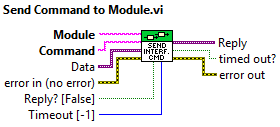
Parameters
Module INPUT
The name of the target module (string)
Command INPUT
The name of the command to be called (string)
Data INPUT
The parameter(s) of the command to be called (variant)
Reply INPUT
Whether to wait for a reply message — if true, the called class must include Send Reply.vi in its module command (boolean)
Timeout INPUT
The maximum wait time for a response in milliseconds
Returns
Reply OUTPUT
The response message, empty if none (variant)
timed out? OUTPUT
Whether the response message timed out (boolean)
How It Works
By properly configuring this, you can easily send a message to another module — all you need are the command name, its parameters, and the module name.
For a module to receive a message, it must be sent to its Message Queue. This is done by querying the queue from the System Core using the module name before sending, allowing you to route the message to the correct queue.
If we are expecting a reply (Reply parameter set to true), the calling module attaches a Reply Queue to the message before sending. After the reply arrives or the timeout expires, the queue is destroyed and the contained message is output via the Reply parameter.
Not all commands can be called externally — only those explicitly made available. Add permitted commands in Interface Module Commands.vi.
- Generic Module Template.ctl
- Available Messages.vi
- Initialize Key Subscriptions.vi
- Initialize Module Keys.vi
- Interface Module Commands.vi
- Set Module Name.vi
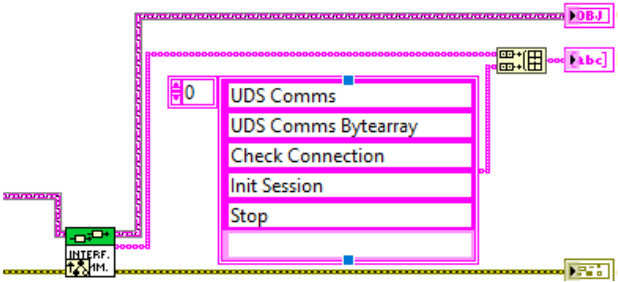
When a module’s Send Module Command Msg function is called,
Do.vi checks whether the received message is one of the
registered callable commands; if so, it executes it; if not,
it generates an error.