TCP Protocol
Applications developed within the framework can also be controlled externally via the TCP protocol, using LabVIEW’s built-in TCP functions.
The TCP connection is not accessible via a fixed port but rather through a named service, utilizing the capabilities of the NI Service Locator. The name of the TCP service can be set in the Main VI during the initialization of the System Core.
The service name may only contain numbers, lowercase and uppercase letters, spaces, and underscores.
Message Format
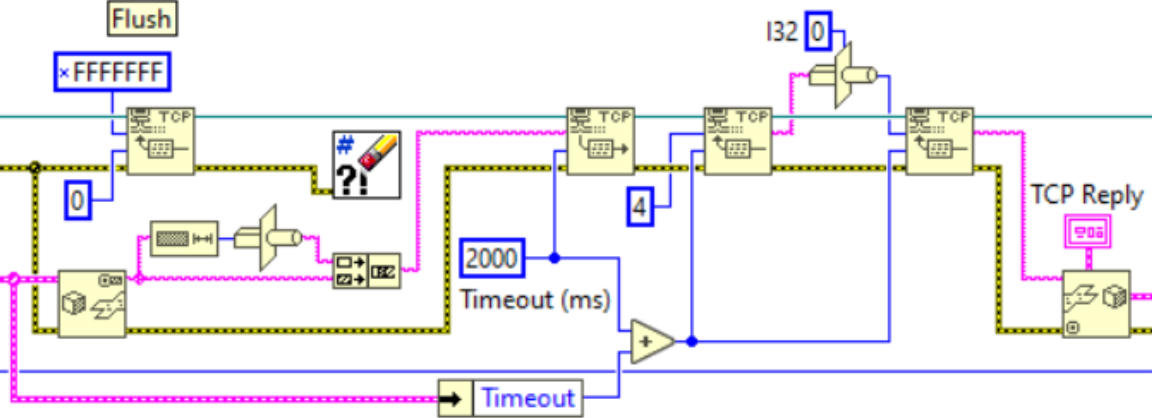
Messages consist of clusters converted to binary text, supplemented by their length. Each message begins with a four-character sequence indicating the length of the remainder of the message. The four characters represent a 32-bit integer, so the maximum allowed message size is approximately 2 GB (2,147,483,647 bytes).
Although the protocol allows large messages, sending very large ones is not recommended. 32-bit LabVIEW can handle a maximum of 4 GB of memory, and a message of nearly 2 GB may not fit alongside other operations. For large data transfers, split into packets of a few hundred MB and send them in multiple messages.
An example of the client-side implementation of TCP communication is the Code Modules.lvlib developed for TestStand. The message handling portion is shown below:
Request Message
The cluster sent in messages consists of the following variables:
Message ID I32
The message number on the given TCP socket
Module Name STRING
The name of the addressed module
Message STRING
The name of the message to send
Parameters VARIANT
The message parameters
Timeout I32
The number of milliseconds the TCP server will wait for a response
Reply Msg? BOOLEAN
Indicates that a response is expected
Response Message
The response cluster contains the following variables:
Message ID I32
The sequence number of the received message on the given TCP socket
Module Name STRING
The name of the addressed module
Message STRING
The name of the received message
Reply VARIANT
Data sent as part of the response
Timeout? BOOLEAN
Indicates if no response was received within the timeout period
Error ERROR
The module can use this to return any errors that occur during execution
Connecting from Other Languages
To establish a TCP connection from another programming language, you need the port of the service registered in the NI Service Locator. Send the following HTTP GET request to the machine running the application:
http://<host address>:3580/<serviceName>?
The system returns the service port as text in the body of the HTTP response.
Currently, to send a message from another programming language, you need to construct binary text compatible with LabVIEW. Information on this can be found in the LabVIEW User Manual .
In the future, the TCP server will be enhanced with JSON and/or XML support, making it easier to send messages from other systems.