Dictionary structure
In the following, I would like to discuss the structure of the dictionary, as well as the translation of the various parameters of the elements most commonly used for display and the differences that arise.
The dictionary consists of records. Each record contains a Key, which can be the name of the given variable or one of its properties (see below), as well as the associated phrases, where the translated Phrases must be entered in the same order in which they were entered in the “Languages” section of the dictionary.
{
   "Format Version":"",
   "Languages":[
       {
           "Language":"English",
           "Font":"",
           "Color":"",
           "Size":""
       },
       {
           "Language":"Hungarian",
           "Font":"",
           "Color":"",
           "Size":""
       }
   ],
   "Phrase Dictionary":[
   	{
           "Key":"Status Message.TipStrip",
           "Phrases":[
               "Show Status Messages",
               "Státusz Üzenetek megjelenítése"
           ]
       }
   ]
}
During the build process, under the Category/Source Files menu, you
must add the Dictionaries folder to the “Always Included” window.
Otherwise, the translation will not work in the project after the
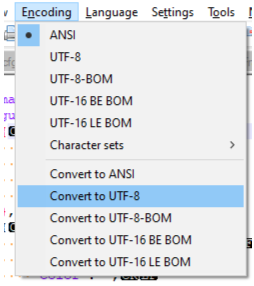
.exe file is generated. It is important that the .json file be saved
with UTF-8 encoding; otherwise, accented characters will display
incorrectly. You can set this in Notepad++ here:
Keywords for machine translation
Variable Name Translation STRING
Key: “VariableName”
Translation only works for variables where Visible Items/Caption has been selected.
→ The translated equivalents of the given variable name.
Bool Button Control Label Translation BOOL
Key: “VariableName.BoolText”
Use when the same label appears for both the True and False states of the button.
→ The label text to display in different languages.
Bool Button Control (Different Labels) BOOL
Key: “VariableName.True” / “VariableName.False”
When using different labels for the True and False states, split the syntax into two records.
→ The labels to display for the True and False states, respectively.
Ring Variable Item Label Translation RING
Key: “VariableName.Item0”
Each element must be added as a separate record, where the number in the key name identifies the element (in the example, “0” refers to the ring variable’s 0th element).
→ The translated equivalents of each element’s label.
Chart Axis Label Translation CHART
Key: “ChartName.xAxisLabel” / “ChartName.yAxisLabel”
The X and Y axis labels must be added as separate records in the dictionary.
→ The translated equivalents of the X-Y axis labels.
Translation of other captions
In addition to the cases discussed above, it is also possible to
translate strings, which can be useful, for example, when translating
various labels or chart legends. In this case, although not mandatory,
it is advisable to define the record key in a format such as
“Label.Something” for better distinguishability, to avoid conflicts
with existing variable names. In this case, the translation can be
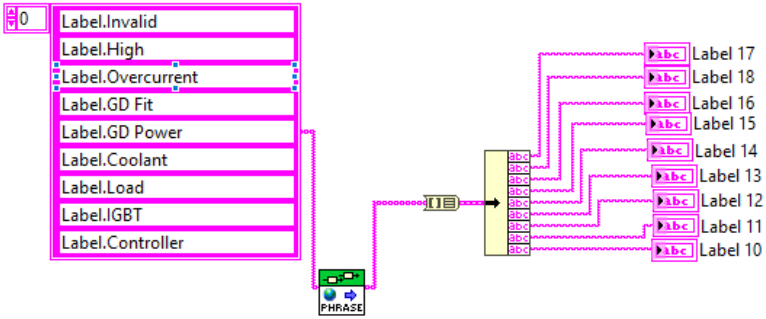
performed using the Get Localized Phrase.vi, which should be placed
in the <Module Events.Language Changed> event so that the translation
occurs immediately after the language change. An example of this is
shown in the figure below, which also demonstrates that it is possible
to translate multiple labels at once.