Module Commands
Module Commands provide a structured way to pass data and trigger actions between different loops within a module — most commonly between the UI loop and the main loop.
How the Command Mechanism Works
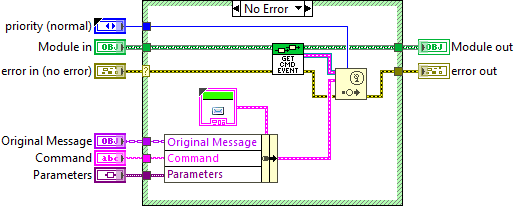
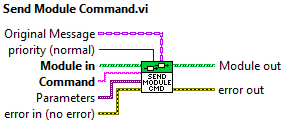
When a Module starts up, it creates its own Module Command User Event and stores a reference to that event in its class variables. Any loop within the module can then generate this event to send data or trigger actions in other loops.
Event Data Structure
The Module Command event carries a cluster with three fields:
{
  "Command": "",
  "Parameters": null,
  "Original Message": "class"
}
Command STRING
The actual command name in text form — identifies which action should be taken
Parameters VARIANT
Carries any data to be passed between loops. Use Variant to support arbitrary types
Original Message CLASS
Forwards the original message class — relevant when executing chained instructions
The primary use of Module Commands is to facilitate data flow between the UI loop and the main loop, cleanly separating these two parts of the program.